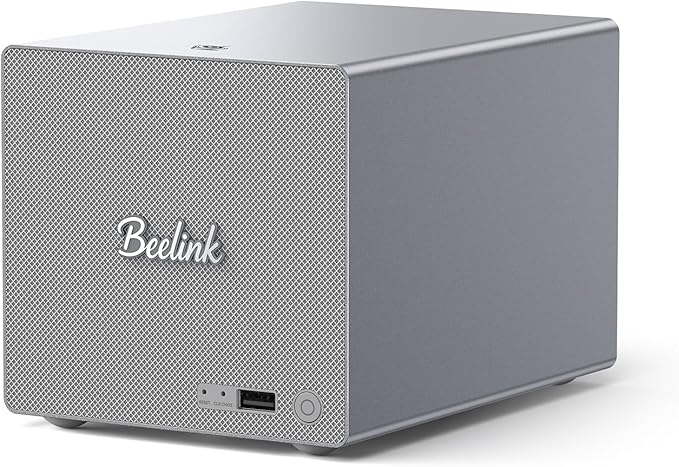
Beelink Me Pro, Mini PC NAS, Intel N150 CPU, 16GB LPDDR5,...
Good for: Research only — consider alternatives first
Watch out for: rating-recovery-manipulation
Last analyzed: February 2026
Total Reviews
230
On Amazon
Verified
95%
Good
Amazon Rating
4.4
Original rating
Savinoo Rating
2.2
Adjusted rating
Our Recommendation
BE CAUTIOUS - Read individual reviews carefully, especially 1-star and 3-star reviews, before purchasing.
Analysis Summary
- MEDIUM RISK (Score: 48/100) Beelink Me Pro, Mini PC NAS, Intel N150 CPU, 16GB LPDDR5,... has some concerning review patterns. Major Issues Found: 81% of reviews are either 5-star or 1-star, with only 19% in between.
- Real products usually have more balanced ratings. Additional Concerns: 4 low ratings were followed by 3 high ratings within 4 days.
- This timing pattern may indicate rating manipulation. 3 low ratings were followed by 3 high ratings within 5 days.
- This timing pattern may indicate rating manipulation. Positive Indicators: 95% of reviews are from verified purchases, which is good..
Customer Reviews from Amazon
Most Helpful Review
"The confusing number of inexpensive mini PCs leaves the BeeLink MINI S12 PRO buried under the others. This is a new Intel design, the N100 Celeron, that is slightly faster and runs cooler than earlier versions. This Mini PC comes with DDR4 and a SATA M.2 SSD which is one reason why the price is very low. There are more expensive Mini's with the N100 that use DDR5 and an nVME PCIe SSD, but the speed increase might not be noticeable on a Celeron system like this.If possible, get this with 16GB RAM because that is the maximum. It costs about $33 for a 16GB RAM module to upgrade this, so it is worth spending $10 to $20 extra and buying the 16GB version. Despite the specified limit of a 2 TB SSD and 2 TB SATA drive, I found that a 4TB M.2 SATA III SSD works fine and a 4TB 70mm SATA SSD works fine too. Mechanical hard disks above 2TB are typically too large to fit in this Mini PC. You will also find that the M.2 SATA III SSDs above 2TB are expensive. I found only one less expensive KingSpec 4TB SATA III SSD for around $200 instead of the typical $300. Getting a different Mini with M.2 nVME PCIe may be a better choice if you plan to upgrade the storage above 2TB. The 2TB M.2 modules cost around $90 to $100 whether they are SATA or nVME.You can use Windows 11 with 128GB of storage, but that doesn't leave much room for storing files. I would consider 256GB the bare minimum, and 512GB is more reasonable. 1TB is plenty for most people. Above 1TB gets expensive compared to the price of this Mini. If you are planning to upgrade the storage, then buy the least expensive version with the least storage, though you may end up getting 8GB of RAM that you want to upgrade for another $33. If you can afford to spend more, it is probably better to spend it on a better processor, or better graphics (meaning a different Mini PC) rather than storage you may never use.This Mini PC is perky and responsive running Windows 11. It can run virtual machines because it has the Intel virtual hardware extensions. It can also use Windows 11 Core Isolation for better security, but that may interfere with virtual machine software. This Mini PC is OK for viewing videos, but it is barely adequate for any 3D gaming or rendering. This is not the PC to get if you need even moderately powerful graphics processing.I bought this model because it was inexpensive, but still quite usable. It also happened to let me use a few parts I had bought for a different Mini PC. If you are starting from scratch, this is the best really inexpensive PC, but you will get more for your money buying a somewhat more expensive Mini with DDR5 and an M.2 nVME SSD.For gaming or heavy graphics processing, video encoding and 3D, you are better off to get one of the Ryzen based minis. Intel's UHD graphics is good, but not great compared to what AMD offers.There is a lot to love about this Mini PC, especially the price. But, you are not going be amazed by the speed, just pleased that it is responsive and didn't cost a lot of money.If you already bought the earlier MINI S version, you can do what I did and move your upgraded RAM and storage to this Mini to get a 20% speed increase, less power use and a cooler PC. It is not possible to do that with the somewhat more expensive DDR5 and nVME Minis that use the N100.If you are wondering about the possible upgrades, this Mini PC comes with 8GB or 16GB of single-channel DDR4 RAM. The maximum RAM is 16GB single-channel and there is ONLY one SODIMM slot. You can't add 8GB. You have to replace the 8GB SODIMM with a 16GB SODIMM. RAM is not "storage", and it is used only for temporarily holding data and programs being used by the processor. If you are going to use multiple programs at the same time, or access large files, more RAM can improve the speed.The storage is divided into two different SATA (Serial ATA) devices that are both a completely different size and type. The Mini PC comes with an installed M.2 SATA III SSD that is a long thin board screwed down to the main board. You can replace the M.2 SATA III SSD with a larger SATA III SSD, but NOT an nVME or PCIe SSD. There is a rubbery heat conductive pad on top of the M.2 SSD board that you should move to any new M.2 SSD board that you install. Position the pad on top of the chips that get the hottest, or so that it covers the majority of the chips on the board. The SSD board still may heat up to between 50c and 60c with the pad in place.The second SATA device can be a "normal" sized SATA SSD or hard disk that goes into a slot in the bottom of the Mini PC (after you unscrew and open the bottom of the case). There is no SSD installed in that slot when you get the PC. There are definite size limitations, so check carefully to see whether a particular disk will fit. Typically SATA SSDs are about 70mm thick, and those will fit. Mechanical drives that fit are 2.5 inches and 70mm thick. Most mechanical drives above 2TB are too thick or large to fit.WARNING"
hotel foxtrot charlie
I love this little guy, I have 6 nvme 1G's in it running zfs under…
I love this little guy, I have 6 nvme 1G's in it running zfs under proxmox. I did have trouble getting truenas/truescale running on it. I have a cluster of proxmox and I use this device as a primary NAS using SMB and NFS. I have plex service on this device, plus the proxmox cluster performs vzdumps to this device.Run quiet, cool, and have not had any issues.jeff
I bought this Beelink in December of 2025. I use it now as a media…
I bought this Beelink in December of 2025. I use it now as a media server, and it has performed beautifully. I immediately did away with Windows and loaded Proxmox onto it and once installed, I then accessed Proxmox remotely via my laptop to create VMs and access those VMs using either the Proxmox shell or via SSH into the VM shells. With Proxmox, I now have it running a LXC for my Plex server and a Ubuntu Server for my Channels DVR. With VPN to my home network, I stream media from this device to offsite, and it works great. I was also able to update the Beelink’s BIOS so it will automatically power itself back on after a power outage. This little device has worked FLAWLESSLY and has run completely SILENT in my living room where it is plugged directly into my router. I was also able to run an HDMI into the TV so on the rare occasions I need to access it directly, it is super easy because I just use the TV. The 1 Tb storage has been enough for me and with SSD prices being what they are in 2026, I’m glad that I don’t need any nVME drives but also happy that the Beelink has so much room for expansion if I ever choose to go down that path. I LOVE this miniPC. A really great purchase!pbroaddog
I bought this to replace an Asustor NAS that was five years old and more…
I bought this to replace an Asustor NAS that was five years old and more than I needed. Bought this box, ditched the preloaded Windows 11 and loaded Truenas. Best file server I’ve had. Highly recommend.michael burgess
Nice little computer. Still getting it setup to store movies and music on. Planty of…
Nice little computer. Still getting it setup to store movies and music on. Planty of room to add more storage. So far easy to use.eric anne
Compact and powerful. Fits 6 M.2 drives and with a Linux distro it makes an…
Compact and powerful. Fits 6 M.2 drives and with a Linux distro it makes an excellent Jellyfin server.robert m wise
Works awesome. Small and quiet. Do take care to use lower power M2 SSDs to…
Works awesome. Small and quiet. Do take care to use lower power M2 SSDs to avoid issues if like me you are using for for 6x4TB M2 SSDs.What Customers Talk About
Commonly Praised
Commonly Complained
Review Quality Analysis
Review quality helps identify authentic customer feedback. Longer, detailed reviews (50+ words) typically indicate genuine experiences, while high percentages of short reviews (under 20 words) may suggest incentivized or fake feedback.
Average Words
129
✓ Detailed reviews
Long Reviews
24%
Average detail
Short Reviews
5%
✓ Low brief reviews
Interpretation: Review quality appears within normal range for this product category.
Review Velocity
Review velocity tracks how quickly reviews are posted. Steady, gradual accumulation is natural, while sudden spikes or bursts (20+ reviews in a single day) may indicate incentivized campaigns or coordinated activity.
Average Per Day
0.04
Natural pace
Max in One Day
2
Normal range
Variable Velocity Pattern
Review posting rate varies over time. This may be linked to promotions, product launches, or seasonal events.
Rating Breakdown
This chart shows how customers rated Beelink Me Pro, Mini PC NAS, Intel N150 CPU, 16GB LPDDR5,.... Products with authentic reviews typically show a bell curve with most ratings in the 3–4 star range. A heavily polarized distribution — many 5★ and 1★ with few middle ratings — can be worth investigating further.
Key Findings
81% of reviews are either 5-star or 1-star, with only 19% in between. Real products usually have more balanced ratings.
4 low ratings were followed by 3 high ratings within 4 days. This timing pattern may indicate rating manipulation.
3 low ratings were followed by 3 high ratings within 5 days. This timing pattern may indicate rating manipulation.
Warning Flags
rating-recovery-manipulation
rating-recovery-manipulation
Not sure about this product?
See alternatives on AmazonReady to buy Beelink Me Pro, Mini PC NAS, Intel N150 CPU, 16GB LPDDR5,...?
Our analysis is based on 230 reviews.
You May Also Want to Check
How does this compare?
This product scores 48/100 — below average. Review the findings carefully before buying.
Check on Amazon