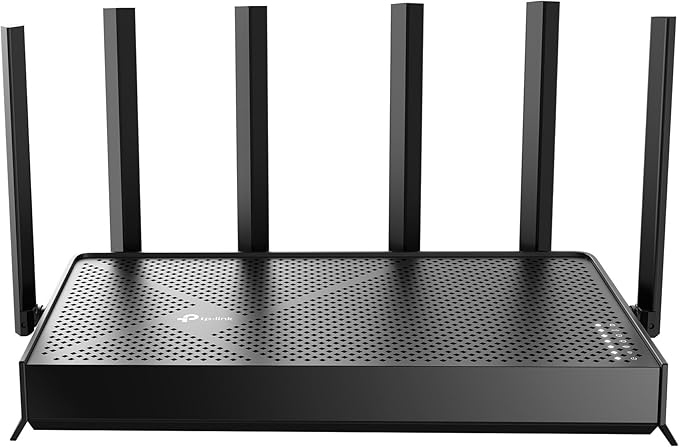
TP-Link Tri-Band BE9700 WiFi 7 Router (Archer BE600) – 10G...
Good for: Buyers willing to read the details before deciding
Watch out for: suspicious-timing
Last analyzed: March 2026
Total Reviews
1,111
On Amazon
Verified
96%
Good
Amazon Rating
4.4
Original rating
Savinoo Rating
2.9
Adjusted rating
Our Recommendation
BE CAUTIOUS - Read individual reviews carefully, especially 1-star and 3-star reviews, before purchasing.
Analysis Summary
- MEDIUM RISK (Score: 57/100) TP-Link Tri-Band BE9700 WiFi 7 Router (Archer BE600) – 10G... has some concerning review patterns. Major Issues Found: 83% of reviews are either 5-star or 1-star, with only 17% in between.
- Real products usually have more balanced ratings. Additional Concerns: Review dates show suspicious clustering patterns, which may indicate coordinated fake reviews. Positive Indicators: 96% of reviews are from verified purchases, which is good. 38% of reviews are detailed (over 100 words), which suggests genuine feedback..
Customer Reviews from Amazon
Most Helpful Review
"I have almost all network devices from TP_Link. Loved them. But now I have to look for another brand that allows users to manage their network instead of a TP_Link device. The problem is that because most users are network challenged we now have the DHCP manage the entire range. And you can’t have ip addresses outside the DHCP.range. Then why allow for the range settings?Stupid. Also not documented so you have to find out that it create an issue with the DHCP.Update. It will allow you to use these addresses, however, you have to be patient. After about 2 hours it was able to connect all the devices with IP addresses out side the DHCP range. Still not happy with how this works but at least it works. For me. In addition the IoT wireless network seems to constantly disconnect devices. Nothing wrong with the device but a router reboot makes it work again. This is happening roughly twice a month now.Update. The frequency of the IoT network failure is now every 8 days. Roughly 3times a month.Time for a better router."
garden mama
This router is just what I needed. I used the app, and setup was a…
This router is just what I needed. I used the app, and setup was a breeze! I did buy a longer ethernet cord (and step up to cat8) separately because of my setup. I also ended up having to use the longer power cord from my old router to reach the power strip... Those things weren't really problems, just something to keep in mind.I used same name/password as my old router, and 90% of my devices automatically connected. Just fantastic!Great speed and signal strength, haven't had any problems in the week it's been in use. So happy I went with tp-link!jcjake40
Fast service, great product!!! Better coverage than my last,must faster
r greene
Replaced my Netgear Wi-Fi 6 with this WI-Fi 7, increased speed ~ 30%. So far,…
Replaced my Netgear Wi-Fi 6 with this WI-Fi 7, increased speed ~ 30%. So far, so good. Had used Netgear forever but the price on this was deciding factor.clannen
I was shocked how easy this was to set-up! Have a smaller two-floor house, put…
I was shocked how easy this was to set-up! Have a smaller two-floor house, put this router in the basement and it seems to reach every corner of the other two floors. Replaced my Verizon (WiFi 5) router AND extender with this device, saving myself the monthly rental fee! Signal strengths tend to be good (not excellent) on the second floor but I can’t discern any indication of a performance drop. Definitely nothing worth buying a $100 extender. Of course, I don’t game though.One criticism: I wish there were a guided process of some sort for the creation of and assignment of devices to the IoT networks. The router seemed to have made a 2.4G IoT network by default but allows you to create a 5G one. However no info is provided on what to assign where or why or if the device automatically manages it.zupjddz
Purchased to replace a Netgear Nighthawk router that was being phased out. I was skeptical…
Purchased to replace a Netgear Nighthawk router that was being phased out. I was skeptical about the TP-Link, but two IT folks praised their performance. Wasn't sure that the TP-Link would have the same reach. I have about 2500 sq. ft home and it reaches all corners including a 3-season room about 60 feet away, the basement and outdoor cameras. Also reaches the front and back patios without a glitch. All that considering the unit sits on an open shelf in the bottom of the TV stand at the far end of the house. I'm an average user, so the WiFi 7 upgrade was a bit more than we needed. I have been pleased with its perfomance since purchasing 4 months ago. The set up was easy as is the Tether app. I was able to set up dedicated 2.4 and 5 GHz and select the band for each device, as well as a dedicated guest network. Happy with the purchase.noah malboeuf
So far after a couple weeks of use it has been fantastic. The tp link…
So far after a couple weeks of use it has been fantastic. The tp link app is easy to set up and makes configuring the router a breeze! For more customization, go to the router configuration page on your browser and tweak some extra settings.Having the ability to separate devices, isolate them, and keep them from accessing other network devices is an amazing feature for certain smart devices that you dont want to communicate to other devices or the internet.You also have the ability to hide your networks and create guest networks. Utilize this!Overall coming from Xfinity gateways, this is a HUGE step up in home network performance.Tip: You can connect an external drive to the usb port on the router and have an easy setup network storage device!What Customers Talk About
Commonly Praised
Commonly Complained
Review Quality Analysis
Review quality helps identify authentic customer feedback. Longer, detailed reviews (50+ words) typically indicate genuine experiences, while high percentages of short reviews (under 20 words) may suggest incentivized or fake feedback.
Average Words
84
✓ Detailed reviews
Long Reviews
38%
✓ Good engagement
Short Reviews
8%
✓ Low brief reviews
Review Length Distribution
Authentic vs Brief Reviews
Average Word Count Gauge
Benchmark: 30 words = moderate, 50+ words = detailed & authentic
84
avg. words per review
Interpretation: Strong indicators of authentic, detailed customer feedback.
Review Velocity
Review velocity tracks how quickly reviews are posted. Steady, gradual accumulation is natural, while sudden spikes or bursts (20+ reviews in a single day) may indicate incentivized campaigns or coordinated activity.
Average Per Day
0.25
Natural pace
Max in One Day
4
Normal range
Variable Velocity Pattern
Review posting rate varies over time. This may be linked to promotions, product launches, or seasonal events.
Unusual Review Bursts Detected
Multiple instances of high review volumes were found within short timeframes. This pattern may be linked to promotional campaigns or coordinated activity.
Rating Breakdown
This chart shows how customers rated TP-Link Tri-Band BE9700 WiFi 7 Router (Archer BE600) – 10G.... Products with authentic reviews typically show a bell curve with most ratings in the 3–4 star range. A heavily polarized distribution — many 5★ and 1★ with few middle ratings — can be worth investigating further.
Key Findings
83% of reviews are either 5-star or 1-star, with only 17% in between. Real products usually have more balanced ratings.
Review dates show suspicious clustering patterns, which may indicate coordinated fake reviews.
Warning Flags
suspicious-timing
Not sure about this product?
See alternatives on AmazonReady to buy TP-Link Tri-Band BE9700 WiFi 7 Router (Archer BE600) – 10G...?
Our analysis is based on 1,111 reviews.
You May Also Want to Check
How does this compare?
This product scores 57/100 — below average. Review the findings carefully before buying.
Check on Amazon