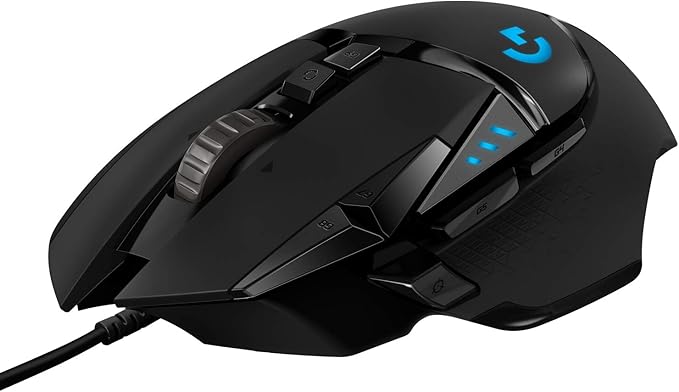
Logitech G502 Hero High Performance Wired Gaming Mouse, Hero...
Good for: Research only — consider alternatives first
Watch out for: suspicious-timing
Last analyzed: March 2026
Total Reviews
57,379
On Amazon
Verified
100%
Good
Amazon Rating
4.6
Original rating
Savinoo Rating
2.3
Adjusted rating
Our Recommendation
BE CAUTIOUS - Read individual reviews carefully, especially 1-star and 3-star reviews, before purchasing.
Analysis Summary
- MEDIUM RISK (Score: 47/100) Logitech G502 Hero High Performance Wired Gaming Mouse, Hero... has some concerning review patterns. Major Issues Found: 83% of reviews are either 5-star or 1-star, with only 17% in between.
- Real products usually have more balanced ratings. Additional Concerns: Review dates show suspicious clustering patterns, which may indicate coordinated fake reviews. Low author diversity detected - some reviewers may have written multiple reviews. Positive Indicators: 100% of reviews are from verified purchases, which is good. 38% of reviews are detailed (over 100 words), which suggests genuine feedback..
Customer Reviews from Amazon
Most Helpful Review
"If you talk about this mouse, you really need to talk about the Logitech software, There are 3 different downloads at the Logitech website to change your 5 profile settings if you don't like the default settings on the G502. The one they will suggest first is G HUB and it is by far the worst and most convoluted to learn to setup and use. The second which they are phasing out is Logitech Gaming Software. (If you install both G HUB and Logitech Gaming Software, and you try to use Logitech Gaming Software, it will not allow you to use it, and it will tell you to use G HUB instead even though many FAQ's at the Logitech website still refer to Logitech Gaming Software.) However, the third, and the one you should download and use, is called Onboard Memory Manager. It is very simple and easy to figure out, does almost everything you want it to, and it doesn't also install a lot of other crap on your system.NOTE: If you do wind up installing G HUB or Logitech Gaming Software, the setting DPI LIGHTING for "ALWAYS ON" is unchecked by default and is not in Onboard Memory Manager. (By default, when you change profiles, the side DPI lights on the G502 briefly go on and then go off to indicate what profile you are on.) I suspect this setting is unchecked by default for a reason, because I could not get it to work properly when set to "ALWAYS ON". When this option is checked the side DPI lights would not stay on the proper profile indicator to indicate the current profile setting, and they would randomly change (such as when I used the scroll wheel.) What I did was to keep this setting in G HUB or Logitech Gaming Software unchecked. Then in Onboard Memory Manager I would select a fixed color for each profile so I would always know what profile I was currently on. (BTW, this is similar to what is on the wireless G305 mouse but they are only small dots of color, you can't change the default colors, and they only select up to 5 different DPI settings on only one available onboard profile as opposed to the 5 profiles each with 5 DPI settings on the G502.)Unless you have a desire to be frustrated, do yourself a favor and just download Onboard Memory Manager. On the G502, the only reason I can see for using G HUB or Logitech Gaming Software is if you want to change settings for mouse click one or two, which Onboard Memory Manager won't allow, or if you want to setup profiles for individual games and software on your computer, in which case I would lean in favor of Logitech Gaming Software which is much more intuitive and easy to use.All that being said, once you get past setting the G502 up, the mouse performance is outstanding. I didn't add the weights since the mouse felt fine to me. And even though the highest default DPI setting is at 6400, you can set it all the way up to 25,600 if you wish. Also, I have small hands, and even though some of the buttons I will never be able to push without really reaching, it's very comfortable using for long periods of time, and for the current price you can't beat it."
breana mcclellan
The Logitech G502 HERO is honestly the best mouse I’ve ever used! I absolutely loved…
The Logitech G502 HERO is honestly the best mouse I’ve ever used! I absolutely loved it while I had it. It’s super customizable, you can adjust the weight to fit your preference, and it even has a dedicated sniper button, which is such a cool feature for gaming.The performance is amazing, and it feels really precise and comfortable to use. I did end up trading it in for the wireless version, but only because I decided it was worth the upgrade. Overall, this is hands down one of the best gaming mice out there.charlie m
I LOVE Logitech products because they last a VERY long time. I love how this…
I LOVE Logitech products because they last a VERY long time. I love how this mouse feels in my hand and it's just so comfortable. It's not to big or to small and it fits perfectly. It has lots of buttons for you to accidentally push, especially if you are gaming lol.I love the fact that on the bottom, you can open it up and put in as many magnetic weights inside to hardly any to none. It just depends on how much weight you want your mouse to have. I Love a good weighty mouse, so this mouse is perfect. You can also make the colours change consistently, or have it one solid colour. The scroll button in the middle is amazing! You can lock it so that it doesn't scroll very fast, and unlock it to ZOOOOM pretty quickly to the bottom of the page and I LOVE that feature.Logitech is the best when it comes to electronics. I had speakers from them that I had bought a good 15 to 20 years ago and they just NOW went out on me. So I suspect this mouse is going to last me a very, VERY long time. :)nathaniel w
The Logitech G502 Hero is fantastic. It feels solid and comfortable, with precise tracking that…
The Logitech G502 Hero is fantastic. It feels solid and comfortable, with precise tracking that makes gaming a breeze. The customizable buttons and adjustable weight system let me tailor it perfectly to my setup. Build quality is top-notch, and the software, once you get used to it, is very powerful. Definitely one of the best mice I’ve ever used—worth every penny.sam
I have had this mouse for over 5+ years, along with my Logitech G213 Prodigy…
I have had this mouse for over 5+ years, along with my Logitech G213 Prodigy keyboard. This was a great mouse that lasted me forever. It is a wired mouse that you can change the RGB like most, and it is a great mouse that allows you to have any DPI that you could want.The look is nice with the mouse, and it has a nice feel in the hand, especially if you have larger hands, like I do, especially. I rest my thumb on the bottom left lip of the mouse, and it works terrific for that, and has great reach to the Mouse's 5 and 6 buttons. It does have an infinite scrolling button if you want to as well, like most Logitech mice do now, and it works well!I did end up replacing this mouse, but not because it broke! I just switched up the look of my setup and wanted something new. This thing lasted me 5+ years, and I felt like I would put it to rest for a bit. It still worked great, and I still have it, in case anything happens. Great value for the money! Especially if you want to pair it up with the Logitech G213 Prodigy. These are old, I know! But these are great for anyone who is just getting into gaming, or wanna give Logitech a shot, as you might be a fan of a different brand, but you don't wish to spend over $100+ with each purchase, just to try the brand out.anri
There are cheaper mice, but until they outsource to a worse quality and at the…
There are cheaper mice, but until they outsource to a worse quality and at the time of purchase, the quality has been consistent. Most dependable, easiest to use, fits hand, adjustable weight, sturdiness of having a corded mouse, years worth of click abuse, scroll wheel is mostly dependable, good for gaming, good for shtposting.garry c
If you talk about this mouse, you really need to talk about the Logitech software,…
If you talk about this mouse, you really need to talk about the Logitech software, There are 3 different downloads at the Logitech website to change your 5 profile settings if you don't like the default settings on the G502. The one they will suggest first is G HUB and it is by far the worst and most convoluted to learn to setup and use. The second which they are phasing out is Logitech Gaming Software. (If you install both G HUB and Logitech Gaming Software, and you try to use Logitech Gaming Software, it will not allow you to use it, and it will tell you to use G HUB instead even though many FAQ's at the Logitech website still refer to Logitech Gaming Software.) However, the third, and the one you should download and use, is called Onboard Memory Manager. It is very simple and easy to figure out, does almost everything you want it to, and it doesn't also install a lot of other crap on your system.NOTE: If you do wind up installing G HUB or Logitech Gaming Software, the setting DPI LIGHTING for "ALWAYS ON" is unchecked by default and is not in Onboard Memory Manager. (By default, when you change profiles, the side DPI lights on the G502 briefly go on and then go off to indicate what profile you are on.) I suspect this setting is unchecked by default for a reason, because I could not get it to work properly when set to "ALWAYS ON". When this option is checked the side DPI lights would not stay on the proper profile indicator to indicate the current profile setting, and they would randomly change (such as when I used the scroll wheel.) What I did was to keep this setting in G HUB or Logitech Gaming Software unchecked. Then in Onboard Memory Manager I would select a fixed color for each profile so I would always know what profile I was currently on. (BTW, this is similar to what is on the wireless G305 mouse but they are only small dots of color, you can't change the default colors, and they only select up to 5 different DPI settings on only one available onboard profile as opposed to the 5 profiles each with 5 DPI settings on the G502.)Unless you have a desire to be frustrated, do yourself a favor and just download Onboard Memory Manager. On the G502, the only reason I can see for using G HUB or Logitech Gaming Software is if you want to change settings for mouse click one or two, which Onboard Memory Manager won't allow, or if you want to setup profiles for individual games and software on your computer, in which case I would lean in favor of Logitech Gaming Software which is much more intuitive and easy to use.All that being said, once you get past setting the G502 up, the mouse performance is outstanding. I didn't add the weights since the mouse felt fine to me. And even though the highest default DPI setting is at 6400, you can set it all the way up to 25,600 if you wish. Also, I have small hands, and even though some of the buttons I will never be able to push without really reaching, it's very comfortable using for long periods of time, and for the current price you can't beat it.What Customers Talk About
Commonly Praised
Review Quality Analysis
Review quality helps identify authentic customer feedback. Longer, detailed reviews (50+ words) typically indicate genuine experiences, while high percentages of short reviews (under 20 words) may suggest incentivized or fake feedback.
Average Words
174
✓ Detailed reviews
Long Reviews
38%
✓ Good engagement
Short Reviews
0%
✓ Low brief reviews
Review Length Distribution
Authentic vs Brief Reviews
Average Word Count Gauge
Benchmark: 30 words = moderate, 50+ words = detailed & authentic
174
avg. words per review
Interpretation: Strong indicators of authentic, detailed customer feedback.
Review Velocity
Review velocity tracks how quickly reviews are posted. Steady, gradual accumulation is natural, while sudden spikes or bursts (20+ reviews in a single day) may indicate incentivized campaigns or coordinated activity.
Average Per Day
0.04
Natural pace
Max in One Day
10
Normal range
Steady Velocity Detected
Reviews posted at a consistent, natural pace over time — typical of organic customer feedback.
Rating Breakdown
This chart shows how customers rated Logitech G502 Hero High Performance Wired Gaming Mouse, Hero.... Products with authentic reviews typically show a bell curve with most ratings in the 3–4 star range. A heavily polarized distribution — many 5★ and 1★ with few middle ratings — can be worth investigating further.
Key Findings
83% of reviews are either 5-star or 1-star, with only 17% in between. Real products usually have more balanced ratings.
Review dates show suspicious clustering patterns, which may indicate coordinated fake reviews.
Low author diversity detected - some reviewers may have written multiple reviews.
Warning Flags
suspicious-timing
low-author-diversity
Not sure about this product?
See alternatives on AmazonReady to buy Logitech G502 Hero High Performance Wired Gaming Mouse, Hero...?
Our analysis is based on 57,379 reviews.
You May Also Want to Check
How does this compare?
This product scores 47/100 — below average. Review the findings carefully before buying.
Check on Amazon