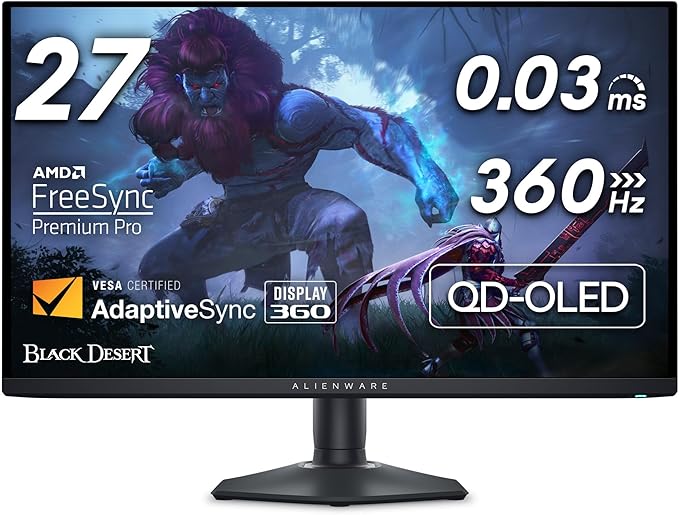
Alienware AW2725DF OLED Gaming Monitor - 26.7-inch...
Good for: Research only — consider alternatives first
Watch out for: suspicious-timing
Last analyzed: March 2026
Total Reviews
1,048
On Amazon
Verified
100%
Good
Amazon Rating
4.3
Original rating
Savinoo Rating
2.2
Adjusted rating
Our Recommendation
BE CAUTIOUS - Read individual reviews carefully, especially 1-star and 3-star reviews, before purchasing.
Analysis Summary
- MEDIUM RISK (Score: 47/100) Alienware AW2725DF OLED Gaming Monitor - 26.7-inch... has some concerning review patterns. Major Issues Found: 84% of reviews are either 5-star or 1-star, with only 16% in between.
- Real products usually have more balanced ratings. Additional Concerns: Review dates show suspicious clustering patterns, which may indicate coordinated fake reviews. Low author diversity detected - some reviewers may have written multiple reviews. Positive Indicators: 100% of reviews are from verified purchases, which is good. 88% of reviews are detailed (over 100 words), which suggests genuine feedback..
Customer Reviews from Amazon
Most Helpful Review
"So I got this monitor as an upgrade from a 1080p 360Hz IPS Alienware, snagging it for $650 on sale. It's truly a "jack of all trades" that excels in both competitive and casual gaming. You get OLED's phenomenal image quality with deep blacks and vibrant colors that make games like Red Dead Redemption 2 look great. At the same time, it offers near-instant response times and super-clear motion clarity, which is great for competitive FPS. The 1440p resolution and high refresh rate make spotting enemies easier, and aiming feels natural.With new 480Hz OLED variants hitting the market, you might wonder about the refresh rate. I haven't tested anything above 360Hz, but I'd imagine there's a subtle yet tangible difference. However, if you can find this monitor at a good price, the balance of features still makes it a solid pick, especially since newer tech often comes at a premium.The build quality is nice, with some RGB on the back that can be customized (or turned off). While I didn’t use the stand, it appeared to be of decent quality. The monitor itself is sleek and doesn’t scream "gamer," which I like. It blends well into an office setting, though you can tell it's a premium product even from a distance. There’s a slight purple-ish tint to the coating, and if there’s light in the background, it doesn’t reflect the best, which can impact image quality and blacks slightly. Be mindful of light sources if you get this monitor. It’s also a bit of a fingerprint magnet, but it comes with a cloth that works well for cleaning. On the plus side, there’s a 3-year burn-in warranty. I can’t speak on Alienware/Dell’s customer service as I haven’t had to deal with them, but the peace of mind is nice.The monitor does have quirks, mostly related to the OLED panel. You’ll need to run a 5-minute pixel refresh every few hours to prevent burn-in. This isn’t particularly invasive but can cause some anxiety during long gaming sessions. Brightness has been perfectly fine for my dim room setup at 95%, but if you play in a brighter room, you might want to reconsider. As someone who was initially worried about brightness, I’ve found it to be fine. The HDR implementation is good, offering both HDR 1000 and HDR "True Black" (400) modes. You can switch between these directly from the OSD, with HDR 1000 working best in darker games and True Black being better for desktop use and brighter titles.There are some minor text clarity issues due to the QD-OLED subpixel layout, though adjusting ClearType and OSD sharpness helps. You can’t use DLDSR/DSR above 240Hz due to DSC requirements, but these are minor inconveniences rather than deal-breakers. For settings, I’d recommend the "Creator" mode preset and enabling 10-bit color. The monitor also includes features like customizable crosshairs and a dark stabilizer. However, the dark stabilizer is less effective on this OLED panel compared to traditional LCDs due to OLED’s true blacks.Overall, if you can catch this monitor at a decent price and don’t mind some OLED-specific quirks, it’s worth the premium for anyone wanting a single monitor that can do it all. You don’t really sacrifice much with this monitor. Just do your research on OLED technology and its characteristics before pulling the trigger. While the improved image quality and color make the quirks worth dealing with, it’s important to know what you’re getting into."
atb
Alienware has been pushing boundaries in gaming hardware for years, but the AW2725DF 27" OLED…
Alienware has been pushing boundaries in gaming hardware for years, but the AW2725DF 27" OLED gaming monitor takes things to a new level. With a jaw-dropping 360Hz refresh rate, ultra-low response times, and an OLED panel delivering unmatched contrast and color, this monitor is a dream for competitive and immersive gamers alike.After several weeks of testing across FPS, racing, and cinematic titles, I can confidently say this is one of the most impressive gaming displays currently on the market.Stunning OLED Picture QualityAt the heart of this monitor is a 2560x1440 (QHD) OLED panel, which instantly sets it apart from most other 360Hz monitors still using IPS or TN technology. The OLED screen produces true blacks, infinite contrast ratios, and incredibly vibrant colors. Whether you're exploring shadowy ruins in Elden Ring or battling under neon lights in Cyberpunk 2077, the visual depth is breathtaking.HDR performance is equally impressive. With DisplayHDR True Black 400 certification, highlights pop, shadows stay rich, and there’s no annoying haloing or blooming. OLED’s pixel-level illumination allows for exact detail in both dark and bright scenes, giving you a cinematic experience even during intense gameplay.360Hz Refresh Rate – Smooth as SilkWhere this Alienware OLED really shines is in its 360Hz refresh rate, delivering ultra-smooth motion with practically no input lag. Paired with a 0.03ms response time, this monitor is a top-tier weapon for esports enthusiasts and competitive players. In titles like Valorant, Overwatch 2, and CS2, every flick and movement feels instantaneous and fluid.The QHD resolution hits a sweet spot between performance and sharpness. It’s easier to drive than 4K, yet sharper than 1080p — perfect for serious players who don’t want to compromise clarity for speed.With NVIDIA G-SYNC Compatible and AMD FreeSync Premium Pro certification, screen tearing is a non-issue. The adaptive sync support works seamlessly across GPUs and ensures consistent frame pacing at all times.Design & BuildAlienware continues its trend of clean, futuristic aesthetics. The AW2725DF sports a matte black and white chassis with customizable RGB lighting on the back. The stand is fully adjustable (height, swivel, tilt, pivot) and extremely stable. Cable management is clean and intuitive, and the slim bezels keep the focus on your game.Ports include DisplayPort 1.4, HDMI 2.1, USB 3.2 hub, and a headphone jack — all conveniently placed.Burn-in Concerns?One of the few drawbacks with OLEDs is potential burn-in, especially for static UI elements. Alienware includes pixel-shifting and screen care features to minimize risk. For most gamers, especially those who don’t leave static images onscreen for hours, burn-in should be a rare issue — not a dealbreaker.Final VerdictThe Alienware 27" OLED 360Hz Gaming Monitor is a stunning blend of speed, responsiveness, and cinematic visuals. It’s expensive, but it’s in a class of its own. If you’re a competitive gamer who refuses to compromise on image quality, this is the ultimate display.Rating: 5/5 – Elite performance meets breathtaking visuals. A monitor built for serious play.andy
So I got this monitor as an upgrade from a 1080p 360Hz IPS Alienware, snagging…
So I got this monitor as an upgrade from a 1080p 360Hz IPS Alienware, snagging it for $650 on sale. It's truly a "jack of all trades" that excels in both competitive and casual gaming. You get OLED's phenomenal image quality with deep blacks and vibrant colors that make games like Red Dead Redemption 2 look great. At the same time, it offers near-instant response times and super-clear motion clarity, which is great for competitive FPS. The 1440p resolution and high refresh rate make spotting enemies easier, and aiming feels natural.With new 480Hz OLED variants hitting the market, you might wonder about the refresh rate. I haven't tested anything above 360Hz, but I'd imagine there's a subtle yet tangible difference. However, if you can find this monitor at a good price, the balance of features still makes it a solid pick, especially since newer tech often comes at a premium.The build quality is nice, with some RGB on the back that can be customized (or turned off). While I didn’t use the stand, it appeared to be of decent quality. The monitor itself is sleek and doesn’t scream "gamer," which I like. It blends well into an office setting, though you can tell it's a premium product even from a distance. There’s a slight purple-ish tint to the coating, and if there’s light in the background, it doesn’t reflect the best, which can impact image quality and blacks slightly. Be mindful of light sources if you get this monitor. It’s also a bit of a fingerprint magnet, but it comes with a cloth that works well for cleaning. On the plus side, there’s a 3-year burn-in warranty. I can’t speak on Alienware/Dell’s customer service as I haven’t had to deal with them, but the peace of mind is nice.The monitor does have quirks, mostly related to the OLED panel. You’ll need to run a 5-minute pixel refresh every few hours to prevent burn-in. This isn’t particularly invasive but can cause some anxiety during long gaming sessions. Brightness has been perfectly fine for my dim room setup at 95%, but if you play in a brighter room, you might want to reconsider. As someone who was initially worried about brightness, I’ve found it to be fine. The HDR implementation is good, offering both HDR 1000 and HDR "True Black" (400) modes. You can switch between these directly from the OSD, with HDR 1000 working best in darker games and True Black being better for desktop use and brighter titles.There are some minor text clarity issues due to the QD-OLED subpixel layout, though adjusting ClearType and OSD sharpness helps. You can’t use DLDSR/DSR above 240Hz due to DSC requirements, but these are minor inconveniences rather than deal-breakers. For settings, I’d recommend the "Creator" mode preset and enabling 10-bit color. The monitor also includes features like customizable crosshairs and a dark stabilizer. However, the dark stabilizer is less effective on this OLED panel compared to traditional LCDs due to OLED’s true blacks.Overall, if you can catch this monitor at a decent price and don’t mind some OLED-specific quirks, it’s worth the premium for anyone wanting a single monitor that can do it all. You don’t really sacrifice much with this monitor. Just do your research on OLED technology and its characteristics before pulling the trigger. While the improved image quality and color make the quirks worth dealing with, it’s important to know what you’re getting into.nick
I upgraded from a 31.5" 165hz ASUS Tuff 1440p VA panel monitor, decided I'd use…
I upgraded from a 31.5" 165hz ASUS Tuff 1440p VA panel monitor, decided I'd use the ASUS monitors as my side displays...The OLED is nice and obviously noticeable, especially in certain scenes like media when going on Netflix or Amazon or w/e, it does register as 10-bit in my Nvidia control panel, is 240hz, is amazing for gaming for sure.. I try to turn it off whenever I'm not at my computer, which isn't often because of apparent possibility of "burn in", but I havent noticed any burn in. I wish I played more games because the immersive UW is cool, but for coding and such, I think I prefer just to have more displays rather than trying to split screen on a single monitor. Screen refresh is barely noticeable, I only notice it when I'm coding and it's not irritating in any way, infact, I almost wish it was a little more intrusive to really refresh all pixels more and preserve the monitors life longer.Ive seen some people complain about the glossy screen that gets marks on it easily, but tbh I think that's one of the cooler features of this monitor, it's visible at all angles and when it's off is shines and looks real sharp. I noticed my ASUS monitor isn't anywhere near as good at viewing the images at a different angle. It comes with a micro-fiber cloth which does erase any smudges 100% also.However, I do have mixed feelings. I was originally looking for 4k OLED, which are a couple hundred bucks more but for a cheaper brand, and they don't come in ultra wide. I can't say for certain if I woulda liked the 4k monitor more or this one... I'm a poor guy, so $700 on a monitor is a lot.Do I have any second thoughts? Well.. I've thought about it, and decided it was worth the money and I'm not going to return it to see if I like the 4k monitors more. Also having the Alienware brand as my main monitor does feel like a kind of flex. I just hope I start playing more games and really let this bad boy shine for it's use purpose.I did hear 4k makes text look a lot clearer, which might be better for coding but I can't say. After watching 1000 youtube videos, it did seem like most consensus was 1440p is the God Mode for monitors so.. Idk.Anonymous
I’ve gone through a good number of gaming monitors over the years, but this is…
I’ve gone through a good number of gaming monitors over the years, but this is my first OLED—and the difference hits you immediately. The colors are incredibly vibrant, the contrast is unreal, and the deep blacks make everything look so clean and cinematic. It honestly makes my old IPS and VA panels feel washed out in comparison.The 34" ultrawide size ended up being perfect for my setup. It feels immersive without being too big, and the curve pulls you in just enough. Whether I’m gaming, watching YouTube, or streaming shows, it fills your field of view in a really natural way.For gaming specifically, this thing is a beast. Paired with my 4070 Ti, 2K ultrawide hits that sweet spot of sharp visuals and high FPS. Fast-paced games look buttery smooth, and motion handling on this OLED is noticeably better than any monitor I’ve owned before. The low input lag and high refresh rate make everything feel responsive, and HDR actually looks good on this panel—not like the fake HDR some monitors try to claim.It also has nice quality-of-life touches: easy-to-navigate settings, a clean design, and surprisingly good brightness for an OLED. I haven’t run into any issues with text clarity or burn-in so far.Overall, this is hands down the best monitor I’ve ever used. If you’re thinking about switching to OLED but unsure if it’s worth it, this model will convince you pretty quickly. Totally happy with the upgrade.rayan syed
I’ve been using the Alienware AW2725DF for the past 4 days and so far, it’s…
I’ve been using the Alienware AW2725DF for the past 4 days and so far, it’s been an excellent experience. No dead pixels, no major issues, and the display is absolutely stunning. The SDR performance is top-tier, and HDR — especially the HDR Peak 1000 mode — is jaw-dropping. Colors pop, highlights shine, and the overall image quality is just on another level.I’m not an OLED expert (this is only my second OLED monitor — the first being the AOC AGON Pro 2), but even with my limited experience, I can say this panel looks phenomenal. Build quality feels premium and solid. I grabbed it for $650 after tax, and for that price, it’s honestly a steal.The reason I’m giving it 4 stars instead of 5 is due to a couple of extremely minor cosmetic flaws. There are very faint micro scratches on the top edge of the screen that are only visible under a flashlight and at the right angle, so they’re practically invisible in daily use. Additionally, I noticed two tiny bubbles/specs — could be nothing, maybe even dust under the film — but still worth mentioning.These are small details, and honestly, I would have rated this 4.6 stars if Amazon allowed half ratings, but since that’s not an option, I’m rounding down to be fair.I’ll update this review if anything changes in the next 30 days, but as of now, I’m very happy with my purchase. If you're considering this monitor for gaming or media, it’s a fantastic choice.jon
Absolutely phenomenal monitor. Coming from an IPS 1440p monitor, it’s a huge step up. The…
Absolutely phenomenal monitor. Coming from an IPS 1440p monitor, it’s a huge step up. The OLED and ultrawide combination is jaw dropping. Everyone that’s seen it is amazed by it. The jump between a regular 1440p and an ultrawide will definitely slightly reduce performance while gaming, but even with a 3060ti I’m managing good frames on almost anything I throw at it. The slight curve really helps immerse you in games too. I had tested a 42” 4K LG OLED TV, but it was just too big, and it really took my PC down to its knees. At its current price of $700, I believe it’s worth every penny. It’s a big graphical upgrade. Games just look so much better with deep shadows and the colors really pop. The one thing I noticed and was aware of before buying is text out of the box looks a little funky. It took a bit of tweaking both within the monitors settings and some 3rd party tools to get it how I liked it. If you were using this primarily as a work/productivity monitor you might be better off without OLED.What Customers Talk About
Commonly Praised
Review Quality Analysis
Review quality helps identify authentic customer feedback. Longer, detailed reviews (50+ words) typically indicate genuine experiences, while high percentages of short reviews (under 20 words) may suggest incentivized or fake feedback.
Average Words
296
✓ Detailed reviews
Long Reviews
88%
✓ Good engagement
Short Reviews
0%
✓ Low brief reviews
Review Length Distribution
Authentic vs Brief Reviews
Average Word Count Gauge
Benchmark: 30 words = moderate, 50+ words = detailed & authentic
296
avg. words per review
Interpretation: Strong indicators of authentic, detailed customer feedback.
Review Velocity
Review velocity tracks how quickly reviews are posted. Steady, gradual accumulation is natural, while sudden spikes or bursts (20+ reviews in a single day) may indicate incentivized campaigns or coordinated activity.
Average Per Day
0.09
Natural pace
Max in One Day
5
Normal range
Steady Velocity Detected
Reviews posted at a consistent, natural pace over time — typical of organic customer feedback.
Rating Breakdown
This chart shows how customers rated Alienware AW2725DF OLED Gaming Monitor - 26.7-inch.... Products with authentic reviews typically show a bell curve with most ratings in the 3–4 star range. A heavily polarized distribution — many 5★ and 1★ with few middle ratings — can be worth investigating further.
Key Findings
84% of reviews are either 5-star or 1-star, with only 16% in between. Real products usually have more balanced ratings.
Review dates show suspicious clustering patterns, which may indicate coordinated fake reviews.
Low author diversity detected - some reviewers may have written multiple reviews.
Warning Flags
suspicious-timing
low-author-diversity
Not sure about this product?
See alternatives on AmazonReady to buy Alienware AW2725DF OLED Gaming Monitor - 26.7-inch...?
Our analysis is based on 1,048 reviews.
How does this compare?
This product scores 47/100 — below average. Review the findings carefully before buying.
Check on Amazon